How many systems does it really take to run a shift team?
Updated 17 August 2026
Where OtisIO sits. We build the one-login platform this guide argues for, so read it as an argument with a stake in the answer. The four things it says one login saves you are the four to hold us to.
Ask most shift managers how many different tools they use to run a working week, and the answer is rarely one. It's usually four or five: a rota tool, a clocking-in machine, maybe a separate patrol system if there's security on site, an HR spreadsheet, and a group chat holding the whole thing together in real time.
None of these tools were chosen badly. Each one solved a real problem when it was bought. The issue is what happens when you add them up.
The hidden cost of a stitched-together stack
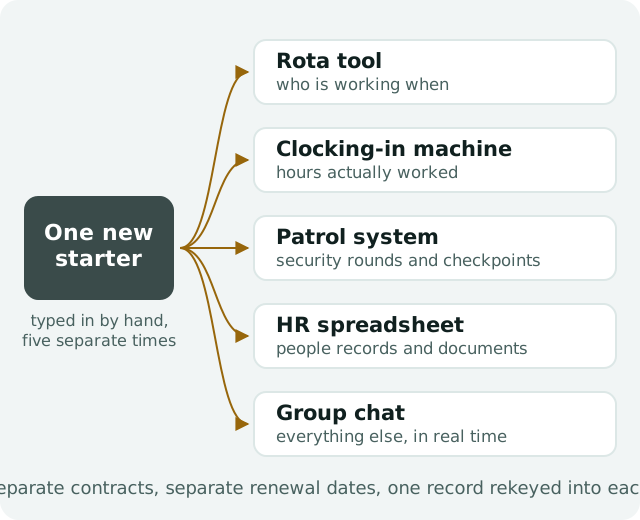
Every extra system in the stack adds three costs that rarely show up on a single invoice:
- Licence cost. Four suppliers means four contracts, four renewal dates, and four support lines to chase when something breaks.
- Admin hours. Someone has to keep the rota tool, the clocking system and the HR record in sync by hand. That's rekeying the same person's details into three places and hoping nobody forgets the fourth.
- Data drift. The rota says one thing, the time clock says another, and payroll ends up running on whichever version someone remembered to check last. Small drifts compound into disputes at month-end, and disputes cost more time than the software ever saved.
None of this is anyone's fault. It's just what happens when a business grows past what one spreadsheet can hold, and picks up tools one problem at a time rather than one platform for the whole working day.
What "one login" actually saves you
The alternative isn't a single tool that does everything badly. It's one platform built around the fact that time, operations, security and HR all touch the same people and the same sites.
When rotas, clocking in, patrols and HR share one login:
- A new starter is added once, not four times across four systems.
- The hours a shift actually ran are the hours payroll runs on, because the clock and the rota are the same record.
- A security round can be tapped on the same kind of NFC tag a staff member already uses to clock in, with no separate reader and no separate contract.
- A lapsed qualification shows up on the rota before someone gets put on a shift they're not certified for, not after.
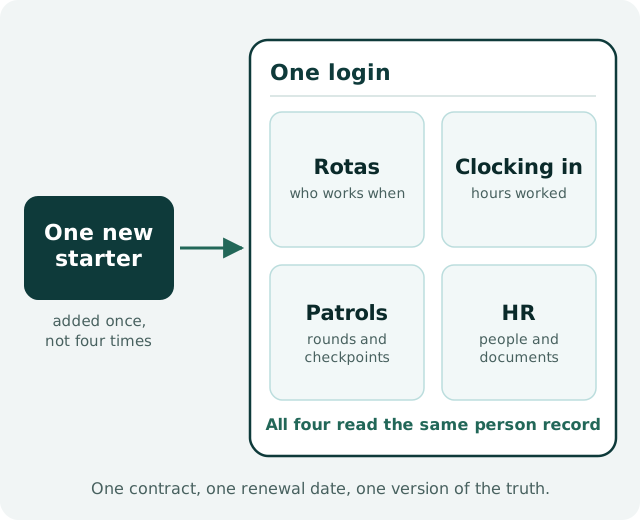
None of this needs to be complicated to set up. It needs the systems to already know about each other, because they were built as one thing rather than bolted together afterwards.
What to look for if you're consolidating
If you're weighing up whether to bring your stack together, a few things are worth checking before you commit to any platform:
- Does it cover the whole working day, or just the part it was built for? A rota tool that's bolted patrols on as an afterthought behaves differently to one built around all four jobs from day one.
- Is location tracking proportionate? GPS checked at clock-in and clock-out is reasonable. GPS tracked all day with activity scores is a retention problem waiting to happen.
- Can you start small and grow into it? A platform that makes you buy every module upfront is really just several tools with one invoice. Look for one plan that's complete for the working day, with specialist modules (asset management among them) that switch on when the business actually needs them.
- Where does the data live, and is it isolated per business? Worth asking plainly, not assuming.
Why this matters more than it used to
Shift-based businesses (construction, security, hospitality, cleaning and healthcare) are under more pressure than most to get scheduling and compliance right, with tighter margins and less room for a payroll dispute or a missed qualification renewal to turn into something bigger. The businesses managing this well aren't the ones with the most tools. They're the ones with the fewest gaps between their tools.
One login covering rotas, clocking in, security patrols and HR isn't a nice-to-have anymore. For a shift team of any real size, it's closer to the baseline.
If you have already decided to consolidate and the question is which platform, the next thing to read is our guide to choosing workforce management software.